
 Tiếng Việt
 हिन्दी
 Español
 Türkçe
 Magyar
 Nederlands
 Bahasa Melayu
 Français
 日本語
日本語Download Threads Voice Fastest & Original Quality
SnapSave – Free, Fast, and Easy-to-Use Threads Voice Downloader
Tip: You can download all Videos, Images, GIFs, and Voice posts from Threads.
Tip: You can download all Videos, Images, GIFs, and Voice posts from Threads.
Threads is not only a platform for sharing videos and images, but also a place where users post audio recordings, voice messages, and many other interesting audio contents. Many Threads Voice posts contain engaging stories, useful insights, or important information that users want to save and listen to anytime without an Internet connection.
However, Threads currently does not support downloading Voice posts directly to your device. That is why SnapSaveApp.com was created, helping you Download Threads Voice quickly, for free, and with original audio quality preserved. No app installation or account registration is required. You can save audio recordings from Threads to your phone or computer in just a few seconds.
Open the Threads app or website and find the post containing the Voice content you want to download. Tap the share icon below the post.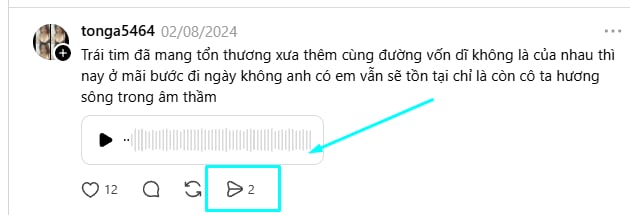
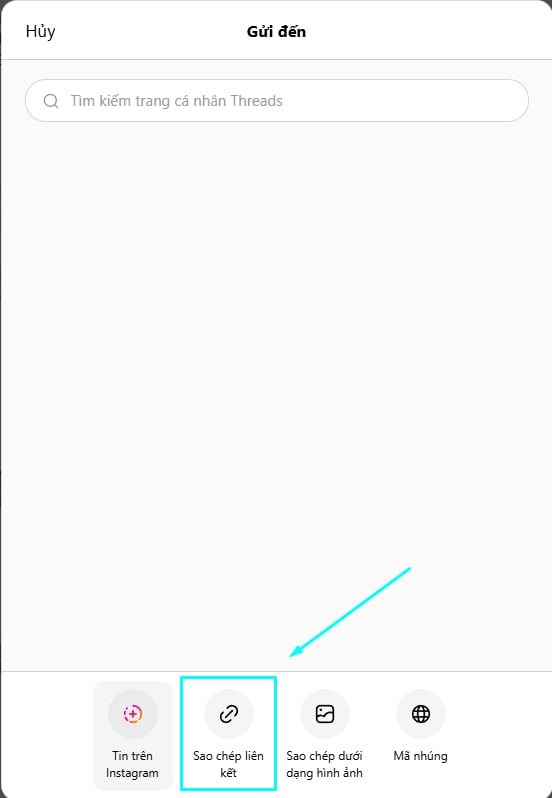
Then select Copy Link to save the post URL to your clipboard.
Visit SnapSaveApp.com and paste the Threads link you copied into the input box on the homepage. The system will automatically detect the audio content from the provided URL.
After successfully pasting the link, click the Download button. The tool will process the URL and extract the audio file from the Threads post within a few seconds.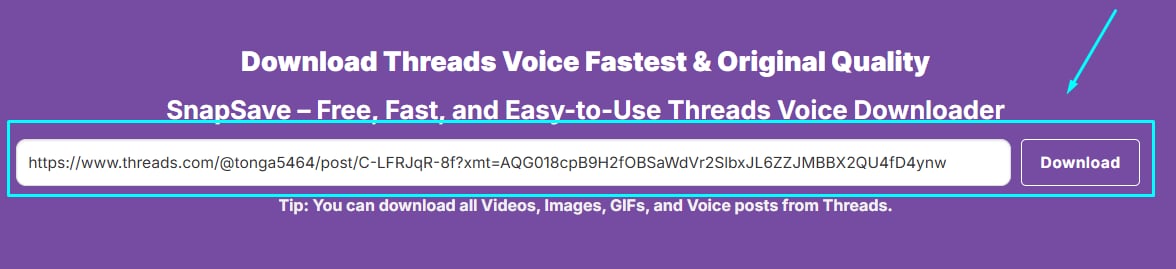
Once the processing is complete, the download link will appear. Select Download to save the Threads Voice file to your Android phone, iPhone, tablet, or computer and listen to it anytime you want.

SnapSaveApp allows you to download Voice content from Threads with the best available audio quality. Simply paste the link and quickly save your favorite audio recordings for offline listening anytime, anywhere.
 Super User-Friendly SnapSave Interface
SnapSave is designed with a simple and intuitive interface, making it easy for anyone to download Threads Voice content in just a few steps. Simply copy the link, paste it into the search box, and click download. The entire process is quick and requires no technical skills.
 Compatible with All Operating Systems
SnapSave works with popular operating systems including Android, iPhone (iOS), Windows, macOS, and Linux. You can download Threads Voice content directly from your web browser without installing any apps or extensions.
 Ultra-Fast Download Speed
SnapSave is optimized to process links quickly and reliably. Simply paste the Threads post URL, and the system will rapidly extract and generate a download link, allowing you to save your favorite Voice content in just a few seconds.
 Free, Safe, and Secure
All features on SnapSave are completely free. You do not need to register an account or provide personal information to download Threads Voice content. Every download is processed quickly and securely to help protect your privacy.
 No Login Required
You can download Threads Voice content without logging into a Threads account or creating a new account. Simply paste the post link, and SnapSave will process it and provide the audio file for immediate download.

SnapSave helps users download Threads Voice content quickly without installing applications or going through complicated steps. With stable processing and a simple workflow, it is an ideal choice for saving audio recordings, useful discussions, and audio content from Threads to your device in just a few seconds.
Yes. As long as the Threads post is still active and publicly accessible, SnapSave can process the link and extract the audio content.
The audio file is usually saved in your browser’s default Downloads folder or in the download directory of the device you are using.
Yes. You can reuse the same link and download the audio file as many times as needed.
Yes. The system is designed to recognize and process supported Threads posts that contain audio content.
In most cases, it only takes a few seconds for the system to process the link and generate the download file, depending on your Internet connection speed.
SnapSave was created with the goal of helping users save audio recordings and voice content from Threads quickly, easily, and efficiently. Instead of using complicated tools or installing additional software, you only need to paste a Threads post link and receive the audio file within seconds.
One of SnapSave’s biggest advantages is its focus on user experience. The interface is designed to be simple and intuitive, making Threads Voice downloads easy even for first-time users. With just a few clicks, you can save your favorite audio clips and listen to them whenever you need.
The system is optimized for fast and stable link processing, reducing waiting times when downloading content. Whether you use a smartphone or a computer, you can conveniently access and use the tool directly through your web browser.
In addition, SnapSave prioritizes user privacy. You do not need to create an account, log into Threads, or share any personal information to use the service. This makes the download process simpler and more comfortable for everyone.
SnapSave is continuously updated to remain compatible with the latest changes on Threads, providing a stable and reliable experience for users across all devices.
Note: SnapSave is an independent tool and is not officially affiliated with Threads or Meta. Users should respect content ownership rights and only download public content or content they are authorized to use under applicable regulations.