
 Tiếng Việt
 हिन्दी
 Español
 Türkçe
 Magyar
 Nederlands
 Bahasa Melayu
 Français
 日本語
日本語Download Video Instagram in High Quality & Without Watermark
SnapSave – The Most Trusted Instagram Video Downloader
Tip: You can download all Videos, Stories, Photos, and Reels from Instagram.
Tip: You can download all Videos, Stories, Photos, and Reels from Instagram.
Instagram is one of the most popular photo and video sharing social networks in the world, where millions of users upload Reels, Stories, IGTV videos, and engaging content every day. Many Instagram posts contain memorable moments, useful knowledge, or interesting trends that users want to save for offline viewing anytime.
However, Instagram does not currently provide a direct feature to download videos to your device. That is why SnapSaveApp.com was created, helping you download video instagram quickly, for free, and in original quality with just a few simple steps. Whether it is a regular Instagram video, Reels, Stories, or IGTV, SnapSave makes downloading easy without requiring app installation or account registration.
Open the Instagram app or website and find the video you want to download. You can copy links from:
Tap the Share button or the three-dot menu (…) and select “Copy Link” to save the URL to your clipboard.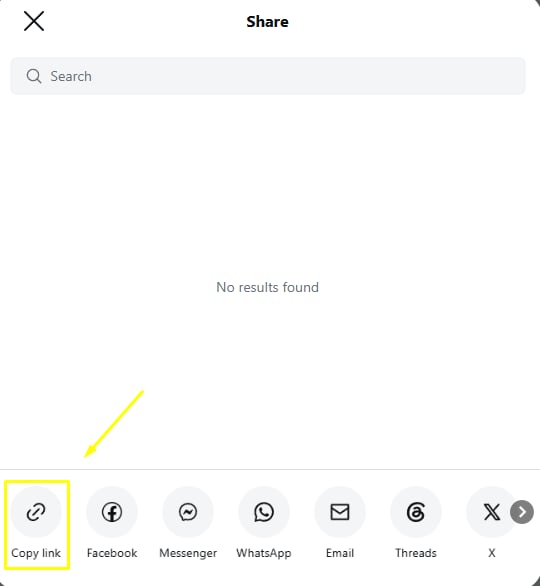
Visit SnapSaveApp.com and paste the Instagram link you copied into the input box on the homepage. The system will automatically detect the content from the URL you provide.
After successfully pasting the link, click the “Download” button. SnapSave will process the URL and extract the video data within seconds.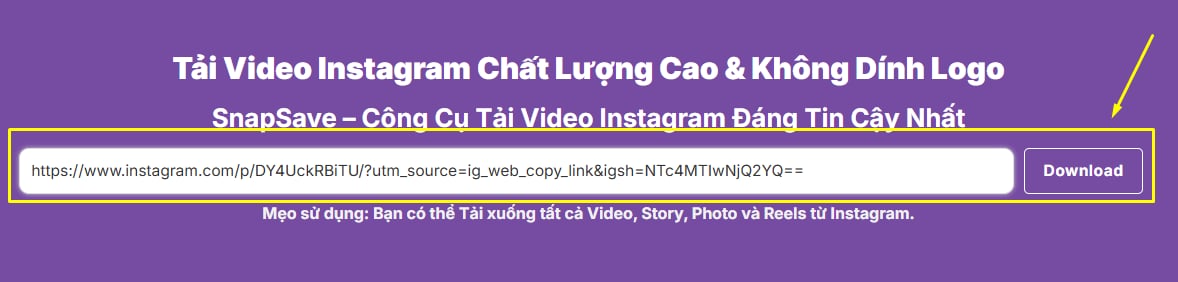
Once the processing is complete, download options will appear. Choose your preferred video quality and click “Download” to save the Instagram video to your phone, tablet, or computer.
Note: SnapSaveApp.com supports downloading Instagram content from multiple formats, including Reels, Stories, IGTV, and regular video posts, allowing you to save your favorite content quickly and conveniently.

SnapSave helps you download Instagram Videos, Reels, Stories, and IGTV in their original quality. Simply paste the link, and the system will process it quickly, allowing you to save videos to your device without quality loss.
 SnapSave Interface Is Extremely User-Friendly and Easy to Use
SnapSave is designed with a simple and intuitive interface, making Instagram video downloading easy for everyone. Simply copy the link of a Video, Reel, Story, or IGTV, paste it into the search box, and click download. The entire process takes only a few seconds and requires no software installation or account registration.
 Works Seamlessly Across All Operating Systems
SnapSave is compatible with most popular operating systems, including Android, iPhone (iOS), Windows, macOS, and Linux. You can download Instagram Videos, Reels, Stories, and IGTV directly through your browser without installing any apps or extensions.
 Ultra-Fast Instagram Video Download Speed
SnapSave is optimized to process Instagram links quickly and reliably. Simply paste the URL of a Video, Reel, Story, or IGTV, and the system will generate a download link within seconds, helping you save your favorite content faster and more conveniently.
 Free, Safe, and Secure
SnapSave provides all Instagram video downloading features completely free of charge. You do not need to register an account or provide personal information to use the service. All Video, Reels, Stories, and IGTV downloads are processed quickly, securely, and with respect for user privacy.
 No Login Required
SnapSave allows you to download Instagram Videos, Reels, Stories, and IGTV without logging into your account or creating a new one. Simply copy the link and paste it into the tool to save your favorite content quickly and conveniently.

SnapSave supports downloading multiple types of Instagram content, including Videos, Reels, Stories, and IGTV, making it easy to save all your favorite content.
Yes. SnapSave strives to preserve the original video quality from Instagram to provide the best viewing experience across all devices.
Absolutely. The tool works directly in your browser and is compatible with Android, iPhone, Windows, macOS, and many other platforms.
SnapSave is built as an online tool, allowing users to download Instagram videos quickly without installing software or browser extensions.
No. You can use SnapSave to download as many Instagram videos as you need without any daily download limits.
In most cases, it only takes a few seconds to process the link and generate the download file. The exact time may vary depending on the video size and your internet connection speed.
SnapSave was developed with the goal of helping everyone download Instagram videos quickly, easily, and securely. Simply copy an Instagram link and paste it into the tool to save Videos, Reels, Stories, or IGTV to your device within seconds, without installing software or creating an account.
Unlike many other downloading tools, SnapSave focuses on the three factors that matter most: speed, quality, and user experience. The system is continuously optimized to process links faster, operate smoothly across all devices, and preserve the original quality of Instagram content.
One of SnapSave key advantages is its fully web-based functionality. Users can download Instagram videos on Android, iPhone, iPad, Windows, macOS, or Linux using only their preferred web browser, without installing any additional applications.
We also place user privacy as a top priority. SnapSave does not require Instagram account login, does not store downloaded content, and does not ask users to provide personal information during the download process.
Currently, SnapSave supports downloading multiple types of Instagram content, including Videos, Reels, Stories, and IGTV. Whether you want to save your favorite videos, educational content, or memorable moments, the tool provides a fast and convenient downloading experience.
Disclaimer: SnapSave is an independent platform and is not affiliated with, endorsed by, sponsored by, or officially connected to Instagram or Meta in any way. Users are responsible for ensuring that downloaded content is used in compliance with applicable copyright laws, privacy regulations, and terms of service.